Edit slides and their elements
Treat the first result as a working draft you can correct and refine.
Give a comparison slide a shorter headline
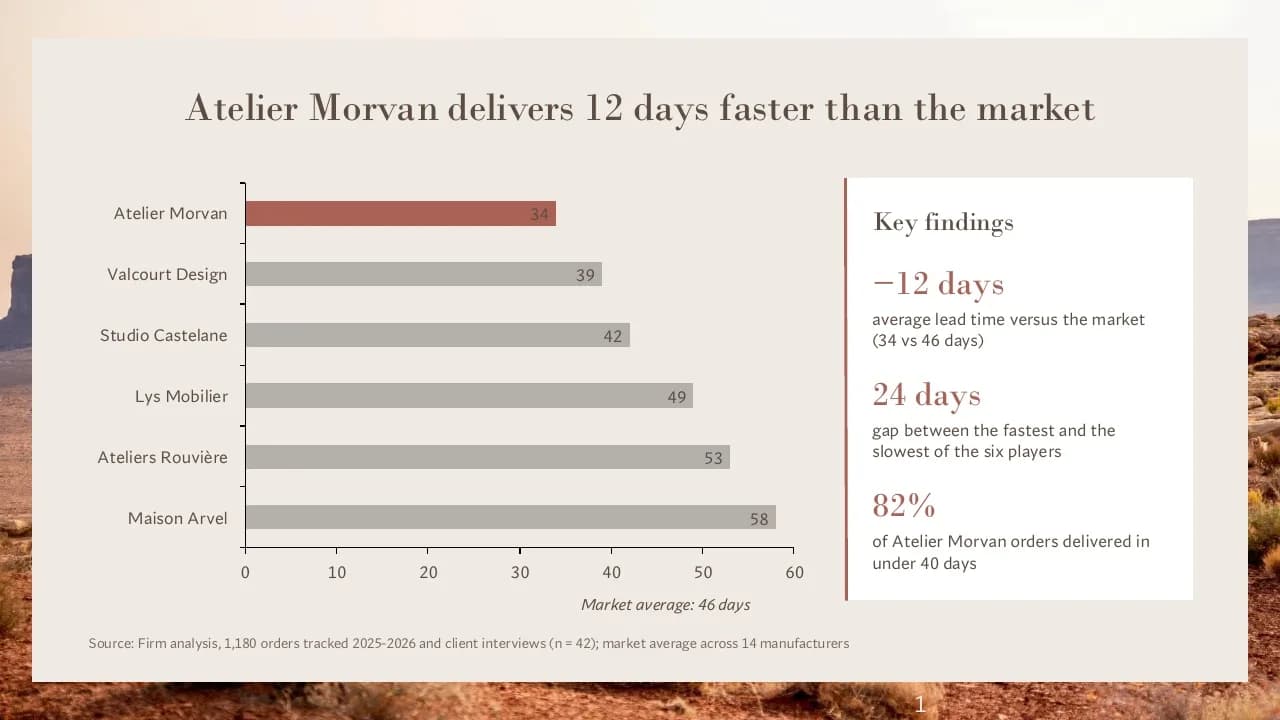
Atelier Morvan delivers orders in 34 days on average, against a market average of 46. For an operations meeting, try asking Paul to change the title to “34 days from order to delivery” and keep the market comparison in the right-hand panel.
Read the red bar and the panel after the edit. The lead time is 34 days and the gap is 12 days. If the shorter headline leaves too much space, adjust its text box in the editor and check its position above the bars.
Refine the content in the conversation
Ask for a shorter summary, a different wording or a clearer order of information. Specify the slide and the purpose of the change to help the AI target the right content, then review the result.
Adjust elements in the editor
Work directly on the text and visual elements of your presentation. Adjust layouts, images or tables when a detail needs precise attention. The editor and the conversation work on the same presentation.
Prepare the final presentation
Check figures, information hierarchy and readability. You can continue the final edits in the exported PowerPoint file. Also check fonts and layouts in the environment where the presentation will be opened.
Check the decision, evidence and ask on a board slide