Return to an earlier version
Return to a saved state when your edits take a different direction.
- v2just now
- v12h ago

Find the version the account team reviewed
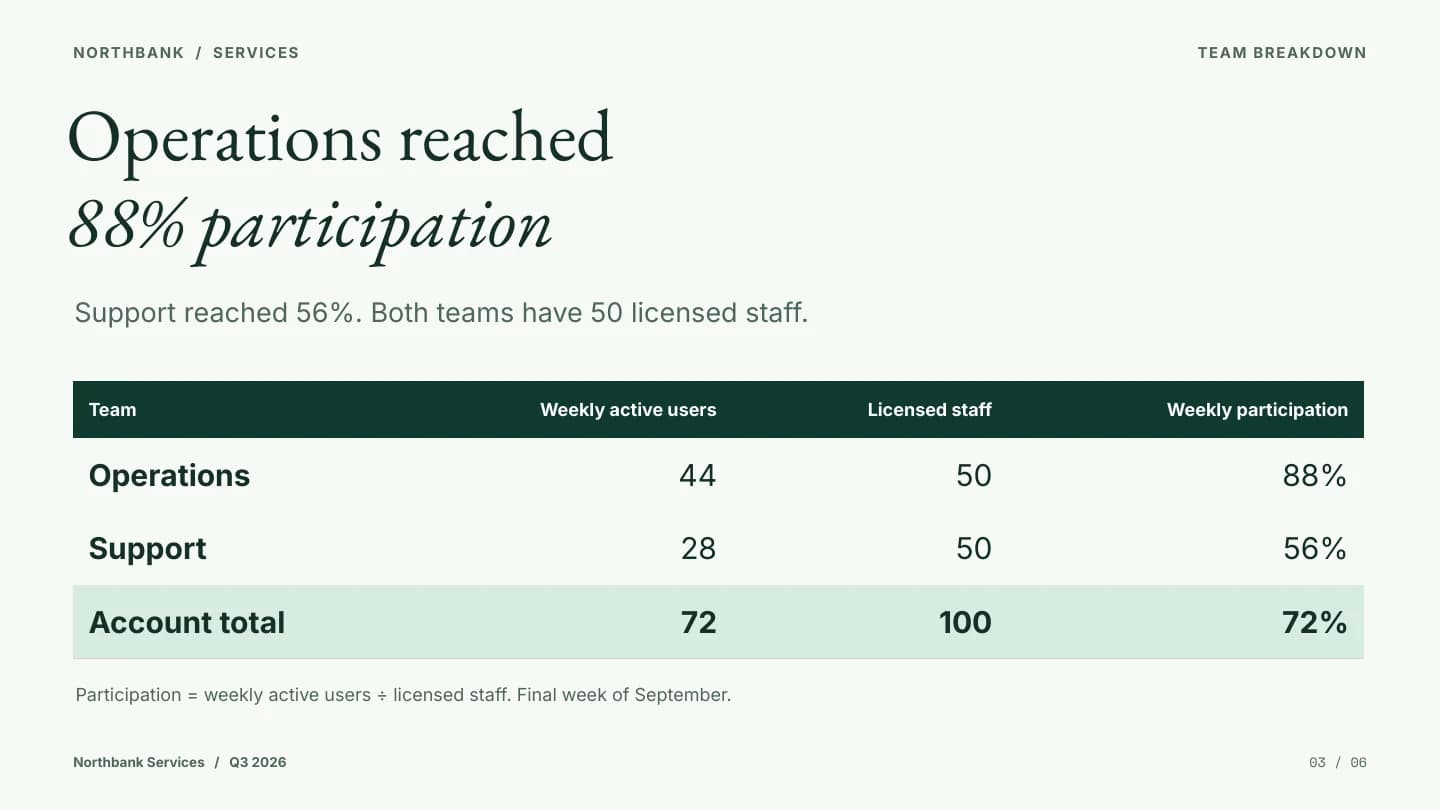
Suppose an early Northbank review showed participation by team and a later draft kept only the account total. The table below gives you a way to recognise the earlier draft. Operations and Support each have their own row.
Open the saved versions from around the review date and look for those two rows in the preview. Check the reporting period on the cover as well before restoring the complete presentation.
Browse saved versions
Version history brings together saved states of the presentation. Find a stage of the work that you want to revisit. History covers recorded versions, without promising a capture of every keystroke.
Restore an earlier stage
Choose the relevant version and restore its content. Review the restored presentation before continuing, particularly when several people work on the same document.
Continue editing and exporting
After restoring a version, keep editing the slides in Paul or prepare another export. History applies to the presentation in Paul; edits made separately to a downloaded PowerPoint file must be managed in that file.